2.0 Making Choices
In this section we introduce the syntax for implementing 'decision' blocks in Python. Traditionally, these are known as conditional clauses or IF-statements.
2.1 Boolean Type
In the previous unit we have seen that values in Python have a specific type. In particular, we have already encountered int (integers), float (floating-point numbers), and str (string) values. There is another type called bool. Unlike 'float' and 'int', which have many possible values, 'bool' has only two: True and False. These are values, just as much as $0$ and $22.43$.
The operators available for combining Boolean variables are: and, or, and not.
# create Boolean variables b1 and b2:
b1 = True
b2 = True

# combine them with the 'and' operator
c1 = b1 and b2
print(c1)

# let's change b1:
b1 = False

c2 = b1 and b2
print(c2)
The and operator produces 'True' if both operands are 'True', and it produces 'False' otherwise.
The or operator produces 'True' if either operand is True, and it produces 'False' only if both are 'False'.
x = float(input('Give a number: '))

y1 = (x > 3)        # create a Boolean variable
y2 = (x < 10)       # create another Boolean variable

# the parentheses above are not needed (strictly speaking),
# but they make the code more readable

z = y1 and y2      # this is equivalent to 3 < x < 10
print('z is:', z)

# depending on the value you provide, z can be 'False' or 'True'
Here is another example:
cold = True                # create Boolean variable 'cold'
windy = False              # create Boolean variable 'windy'

z1 = (not cold) and windy       # here's an expression using the operators NOT and AND
z2 = not(cold and windy)

print('z1 = ', z1)
print('z2 = ', z2)
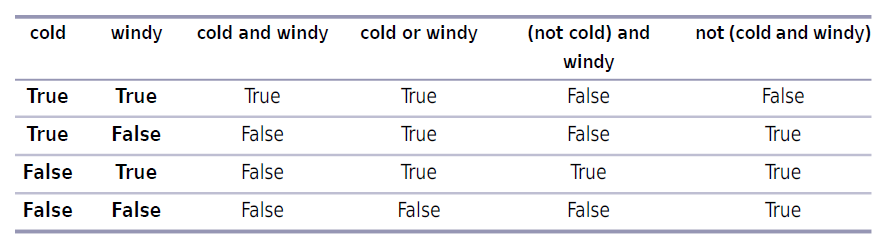
I hope this example has convinced you that it is important to pay close attention to where the parentheses are placed in these kinds of expressions. A table showing all possible values of the examples considered above is included below:
2.2 Relational Operators
Typically, the values 'True' and 'False' are not written down directly in expressions but rather created in expressions. The most common way of doing this is by using a relational operator (as we already did in one of the above examples....which one?).
Here is a list of relational and equality operators that Python recognizes:

A key point regarding the info in this table is that Python uses $==$ for equality instead of just $=$, because the latter is used for assignment. Avoid typing $x=5$ when you mean to check whether the variable $x$ is equal to five: $x==5$ (the correct form).
All relational operators listed above are binary operators: they compare two values and produce
'True' or 'False' as appropriate. For the greater-than ($>$) and less-than ($<$) note the following:
10 < 12 # press 'Run'
22 < 12 # press 'Run'
23 == 23.1 # press 'Run'
22 == 22.0
So far, we have encountered 3 different types of operators: arithmetic, Boolean, and relational. These can be combined to generate more complicated expressions. The following rules apply:
- Arithmetic operators have higher precedence than relational operators; e.g., $+$ and $/$ are evaluated before $<$ or $>$
- Relational operators have higher precedence than Boolean operators; that means that comparisons are evaluated before 'and', 'or', 'not'
- All relational operators have the same precedence
4 + 5 > 3 # same as (4+5) > 3 ; NOT 4 + (5 > 3)!!
You are strongly encouraged to use parentheses since it makes it easier on the eye to spot the meaning of the various conditions that you might need to include in your programs.
It is very common in Mathematics to check whether a value lies in a certain range, i.e. that it is between two other values. You can do this in Python by combining comparisons with 'and':
x = 3                              # user input
print('Is', x, 'in (1, 5] ?')      # add some meaningful text on the screen...
tmp = (1 < x) and (x <= 5)         # define a Boolean variable 'tmp'
print('Check for', x, ':', tmp)    # display the value of 'tmp'
Python allows chained comparisons. This means that instead of checking $((A<B)$ and $(B<C))$, we could simply use $A<B<C$. In the above example this amounts to the following change:
x = 3                              # user input
print('Is', x, 'in (1, 5] ?')      # add some meaningful text on the screen...
tmp = (1 < x <= 5)                 # Boolean variable involving a 'chained comparison'
print('Check for', x, ':', tmp)    # display the value of 'tmp'
The simple IF statement
Conditional statements have a certain look to them, and you must write them in this exact way so that Python knows what you want to do. The general structure of the simplest conditional statement appears below:
<some code before>
.....
if <conditional>:
    <do something>
....
<some code after>
To see this syntax in action, let's consider the following situation. We want to create a program that gets an input number from the user. The number is then checked to see if it is greater than zero. If that's true, we want a message to be displayed on the screen. Finally, the code prints out a message on the screen, whose result does not depend on the aforementioned conditional statement. Here's the code:
num = int(input("Enter a number: "))      # this handles user input
if num > 0:                               # here starts the conditional statement
    print("num is positive")              # will be executed ONLY IF num > 0

print("finished comparing num to 0")      # this statement will be printed irrespective
                                          # of the outcome of the IF statement
We can have more complicated conditional statements:
num_a = int(input("Pick a number: "))      # user input
if num_a > 0:                              # first conditional statement
    print("Your number is positive")

if num_a < 0:                              # second conditional statement
    print("Your number is negative ")

if num_a == 0:                             # third conditional statement
    print("Your number is zero")

print("Finished!")                         # this is printed on the screen after
                                           # the IF statements are executed
Sometimes you want to consider a second decision based on the result of a previous decision. Assume you have to do some shopping to buy bread, and you have a choice of three shops A, B, and C. Each shop offers several different brands of bread. Once you have decided what shop to go to, you'll have to choose which brand of bread you want to buy.
One way to do this in a Python program is using nested conditionals: a second conditional executes only if the result of the first conditional is 'True'. To see how this works in practice we consider two examples side by side; one of them involves a nested conditional, the other is just unnested:
# Nested code
num_a = int(input("Number? "))
num_b = int(input("Number? "))
if num_a < 0:                            # first conditional starts here
    print("num_a: is negative")
    if num_b < 0:                        # the second (nested) conditional
        print("num_b is negative")

print("Finished")                        # this line will be printed out
                                         # independently of the two conditionals above
# Unnested code
num_a = int(input("Number? "))
num_b = int(input("Number? "))
if num_a < 0:
    print("num_a: is negative")
if num_b < 0:
        print("num_b is negative")
print("Finished")

# Note that in this code both conditionals will be executed
# independently of each other
Adding an ELSE to an IF
Sometime you may want to do something else if your expression ends up not being true. To account for this option we could include an else to an if statement. Code in the 'else' block will run only if the expression in the 'if' statement is false. Here's the design pattern:
<some code before>
.....
if <conditional>:
    <do something>
else:
    <do something else>
...
<some code after>
Here is a concrete example:
a = float(input('Give a number between -5 and 5: '))

if a > 2:
    print("Greater than two")
else:
    print("Two or less")
The 'else' statement is completely optional, but if you include the 'else', you have to put a block of code under it. Otherwise, you'll get an error. Like in this example:
a = 7
if  a > 10:
    print("Greater than 10")
else:                                 # no code after 'else' --> don't do that!!

print("Code has finished")
Here is a final example:
# illustrates the use of IF-ELSE construct:

a = float(input('Give first number: '))
b = float(input('Give a second number: '))

if a > b:
    maximum = a
else:
    maximum = b

print('The maximum is', maximum)
Testing many things with ELIF
Sometimes, you want to test more than one condition. For example, you might want to print out a different message based on the day of the week or how much the total is in your shopping cart. In cases like this, you can use an elif statement.
An 'elif' statement is another optional part of an 'if' statement. You will still have to start with an 'if' statement, but after that you can add on 'elif' statements in very much the same way you created the 'if' statement. Here's the design pattern for a single 'elif' statement:
<some code before>
...
if <conditional>:
    <do something1>
elif <conditional>:             # you can add as many of these as you want....
    <do something2>
else:
    <do something3>
...
<some code after>
num = int(input("Enter a number: "))     # user input

if num > 0:                              # if-statement containing an elif block
    print("number is positive")
elif num < 0:
    print("number is negative")
else:
    print("number is zero")
# the user is supposed to guess the secret number by two attempts:
num_a = int(input('Provide an integer: '))
num_b = int(input('Provide an integer: '))

lucky_num = 7     # "secret" number

if num_a > 0 and num_b > 0:
    print("both numbers are positive")
elif num_a < 0 and num_b < 0:
    print("both numbers are negative")
else:
    print("numbers have opposite sign")

if (num_a == lucky_num) or (num_b == lucky_num):
    print("you also guessed my lucky number!")
else:
    print("Better luck next time...")
REFERENCE:
T. Gaddis, Starting out with Python (Fourth Edition), Pearson Education Ltd., 2018