4.0 Lists
Python allows you to group items together in a variable called a list. This is a particular type of 'data structure', more examples of which you are going to encounter on several occasions. The items in a list don't need to be of the same data type; for example, you can store numbers, strings, and even lists. Lists have to be created before they are used. You can remove, add, or change the items of a list (we say that lists are mutable).
Lists are particularly useful because we can use a single variable name to represent an entire collection of items.
4.1 Creating a List
Before we take a closer look, here's how we define a couple of very simple lists:
# this list is empty:
myList = []
print(myList)                # check to see what's in the variable 'myList'

# here's a more meaningul list:
fruit = ['apple', 'blueberry', 'orange', 'grapes']
print(fruit)                # check to see what's in the variable 'fruit'
The elements of a list must be placed between square brackets, as seen above. In the first example we have created an empty list (called 'myList'); later, we may decide to add some elements to it (we'll see how we can do that shortly). In the second example, the name of the list is 'fruit' and the list contains 4 elements (all string literals).
Python keeps track of the position of each element in the list by numbering each element. An item's place in the list is called its index. The convention is that the index associated with the first element is 0, the index associated with the second element is 1, and so on. If you want to access individual elements of a list, you'll have to use the item's index number. You do this by enclosing the index number between square brackets that follow the list's name. Here's how I can print on the screen each element of the list 'fruit' by using this approach:
# lets' unpack the list....

for i in range(4):
    print(fruit[i])
It is important to pay extra attention to the indexing convention employed by Python. We start at 0, not at 1. The last item in the list will have an index number equal to the number of items in the list minus one. Thus, the last element in 'fruit' will be fruit[3]. Recall also that range(4) is the sequence 0, 1, 2, 3 (i.e., 4 is not included). If you try to use an index that exceeds the maximum index, Python will "complain":
print(fruit[6]) # there is NO element with this index in our list
The number of elements in a list can be found with the built-in function len:
grades = ['A', 'B', 'C','D']
print(len(grades))                 # we get 4 because 'grades' has 4 elements
Lists are iterable; that is, they can be used with 'for-loops':
days = ['Monday', 'Tuesday', 'Wednesday', 'Thursday','Friday']
for day in days:
    print(day)
# we can achieve the same with the following
# more "pedestrian" piece of code:

N = len(days)           # get the length of the list
for i in range(N):      # use the 'range' function
    print(days[i])      # print elements of 'days' using the indexing notation
This works nicely because, as you have found out in the previous unit, range(5) corresponds to the sequence: 0, 1, 2, 3, 4. So the loop "prints" days[0], days[1],..., days[4] (i.e., all the elements in the list). You can use this pattern to access all elements of a list in the context of 'for-loops'.
4.2 Manipulating lists
A number of different operations can be carried out on lists. A summary of some basic functions available for manipulating lists is included in the table below (<list > must replaced by the name of your list):
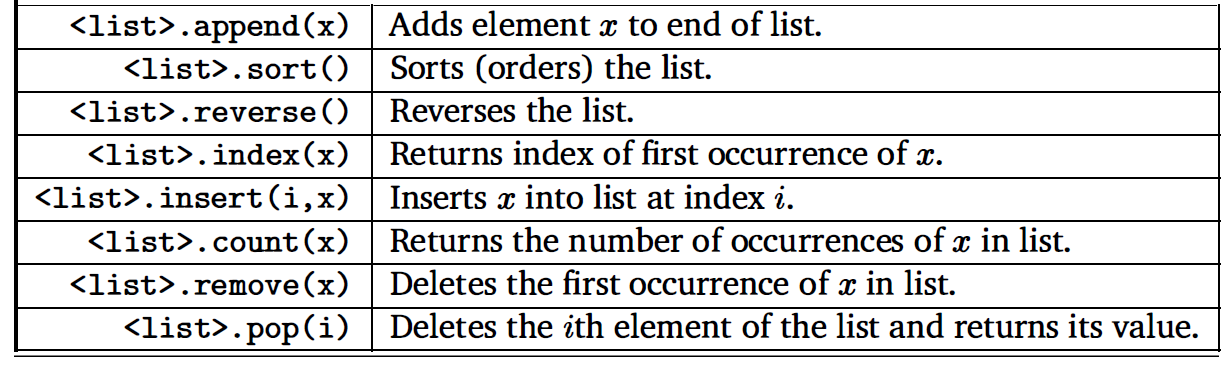
The syntax might look strange at the moment, but it will make more sense once we get to OOP. For now just try to get used to how things must be done. The syntax is illustrated next (use the Internet to see more examples):
# create an empty list:
toppings = []

# start adding some elements:
toppings.append('mushrooms')
toppings.append('olive')

# let's see what's in our list....
print(toppings)
# create 2 lists:
list1 = ['1', '2', '3']
list2 = ['11', '12', '13']

# combine the lists, by adding items from one list
# to the end of the other
list1.extend(list2)

print(list1)            # note that 'list1' has changed....
# let's say we want to change the second element in 'list1'

list1[1] = 'A'        # change '2' to 'A'
print(list1)          # check to see the change....
# maybe you want to remove the 3rd element from list1:

list1.remove(list1[2])         # get rid of '3' (indexing starts at 0)
print(list1)                   # convince yourself of the change....
When you use append or extend the original list(s) is(are) changed. By adding two lists together, a list with all the elements is returned (so you won't change either list). For example:
a = ['Monday', 'Tuesday', 'Wednesday']
b = ['Thursday', 'Friday']

c = a + b        # list concatenation
print(c)         # check to see what happened....
Lists can be multiplied by numbers:
# create a list:
bool_vals = ['true', 'false']

# multiply the list by 4:
res = 4*bool_vals

# check the result of the multiplication....
print(res)
Sometimes it is necessary to arrange the elements of a list in order. For that purpose we use the built-in sort function:
# create a list of names:
myList1 = ['Vivian', 'Oliver', 'Victor', 'Ndugu', 'Pablo']

# check to see the list:
print (myList1,'\n')

myList1.sort()           # this statement arranges the items in alphabetical order
print(myList1)           # check again to see the changes....
# create a list of numbers:
myList2 = [12,-14,23, 673, 234, 19, 456]
print(myList2,'\n')


myList2.sort()             # arranges the number in increasing order
print('Ascending: ', myList2, '\n')

myList2.reverse()          # arranges the number in decreasing order
print('Descending: ', myList2)
Virtually all computer languages provide some sort of data structure similar to Python's list. In other languages it is called an array. Thus, the words 'list' and 'array' can be used interchangeably in Python. To summarise, a list (or array) is a sequence of items where the entire sequence is referred to by a single name, and individual items can be selected by indexing.
Next, let's study the following code:
u = [1, 2, 3, 4, 5]      # create an array 'u'

v = u                    # make a copy of 'u' and store it in 'v'

v.remove(3)              # change the copy

print(u)                 # look again at 'u'....
Clearly, even though we modified the copy ('v') of the original list ('u'), the 'print' statement has revealed that the original list has changed as well. This is because both 'u' and 'v' reference the same location in the memory, and 'v' is just an alias for 'u'. Changes to one of these variables will affect the other.
u is v   # can use the operator 'is' to check the identity of two variables
         # the result is either 'True' or 'False'
If you want to make a copy of a list, but you do not want the changes to your copy to affect the original, you can use the built-in function copy. Study the example included below:
# create 2 lists; the second is a copy of the first:
s1 = [11, 13, 17, 23]
s2 = s1.copy()
print('\nFirst print statements:')
print('s1 is: ', s1)
print('s2 is: ', s2)

# change the copy:
s2.remove(13)

# print the lists again to see what happened:
print('\nSecond print statements:')
print('s1 is: ', s1)
print('s2 is: ', s2)
# create 2 identical lists:
w1 = [0, 1, 2, 3]
w2 = [0, 1, 2, 3]

print(w1 is w2)        # this will print 'False'

w1.remove(0)           # remove '0' from the first list

# check to see the lists again:
print('w1 is: ', w1)
print('w2 is: ', w2)
In this case we would say that the two original lists are equivalent, because they have the same elements, but not identical, because they do not reference the same location in the computer's memory. If two variables are identical, they are also equivalent, but if they are equivalent, they are not necessarily identical.
4.3 Slicing
Often you will want to extract more than just one element from a list. In Python this is made possible by using a technique known as slicing. The design pattern looks like this:
$$ a[stride:end:stride] $$
where 'a' is the name of the list. If 'start' or 'end' are omitted, their defaults correspond to the first and last entries, respectively. In this notation, the 'stride' comes last; if omitted, the default value is $1$.
The element correponding to the index 'stride' is included, but that corresponding to 'end' is excluded.
Slicing is best understood by trying out a few examples:
# create an array:
a = [3, 8, 1, 0, 5, -2, 32]

# various examples of slicing
# (use these to make your own examples)

print(a[:])      # this will print the entire array

print(a[1:])     # prints the array starting with the second element (index=1)

print(a[:3])    # prints the first 3 elements of the array (index=0,1,2)

print(a[1:4])   # prints the block between index 1 and index 4 (the latter is excluded)

print(a[::2])   # prints every other element, starting at the beginning

print(a[::4])   # prints every fourth element

print(a[-1])    # this prints the last element

print(a[::-1])   # prints the array in reverse order
You can safely copy a list using slicing. Here's how you do it:
ss1 = ['Venice', 'Rome', 'Milano']
ss2 = ss1[:]
print('\nFirst print statemenets:')
print('ss1 is: ', ss1)
print('ss2 is: ', ss2)

ss1.append('Catanzaro')
print('\nSecond print statemenets:')
print('ss1 is: ', ss1)
print('ss2 is: ', ss2)
Note that the change made to 'ss1' has not affected the copy (i.e., the list 'ss2').
REFERENCE:
T. Gaddis, Starting out with Python (Fourth Edition), Pearson Education Ltd., 2018