9.0 Dictionaries
In one of the previous units you learned about lists; these were linear collections of data with elements placed at a certain position in the list (the index of an element was used to retrieve elements from such lists). The built-in type 'list' is very useful for storing one group of items (e.g., names or numbers, etc). However, there are many situations in which data comes in pairs: a person and their phone number, a song and its artist, a book and its author(s), and so on.
A dictionary is a built-in data structure that stores a collection of data, in which you look up one item by using another item (rather than an index). In a traditional word dictionary you look up a word to find its meaning. In programming, the item you look up is called the key, and what the item lookup returns is called a value. In the context of the word dictionary mentioned above, the word you look up would be the 'key', while its meaning will correspond to the 'value'.
Each element of a dictionary consists of a key and a value. The 'key' must be an immutable object. A 'value' stored in a dictionary is retrieved by using the 'key' which is associated with.
9.1 Creating a dictionary
To create a dictionary use the following general pattern:
<dictionary> = {key1:value1, key2:value2,....}
where 'dictionary' is the name you chose for the variable that will store your dictionary. Here is a simple example of a dictionary called 'phonebook':
# create a simple dictionary:
phonebook = {'Chris':'555-1111',
             'Katie':'555-222',
             'Joanne':'555-333'}

# KEYS:
#     'Chris'
#     'Katie'
#     'Joanne'

# VALUES:
#     '555-111'
#     '555-222'
#     '555-333'
The elements in a dictionary are unsorted (i.e., they do NOT have a fixed order), so trying to use indexing as in the case of lists won't work. The general syntax for retrieving a value from a dictionary is:
<dictionary>[key]
where 'dictionary' is the name you have chosen for your dictionary and the 'key' must be present in it. When this command is executed, Python will return the associated value paired with the 'key' you have used. If the key is not in the dictionary, then you get an error message (or, to be more accurate, a 'KeyError' exception is raised). You can test whether a key is in the dictionary by using the in and not in operators. This will help you prevent the error message being displayed on the screen. Examples of how we access the values stored in the above dictionary are included below:
phonebook # get the entire dictionary
phonebook['Chris'] # displays Chris' phone number
phonebook['Joanne'] # displays Joanne's phone number
phonebook[Joanne] # I have forgotten to use the single-quote marks...
phonebook['Victor'] # there's no such key in our dictionary
# You can easily sort out the above undesired behaviour, as already explained
# This will require using the keywords 'in' or 'not in':

if 'Victor' not in phonebook:
    print('Victor is not found')    # we get this message displayed
                                    # on the screen
if 'Joanne' in phonebook:
    print(phonebook['Joanne'])    # we get Joanne's phone number
Once you know how to create a dictionary and access the values stored in it, the next item on the agenda is to find out what else is available.
Values stored in a single dictionary can be of different types; in the next example the 'keys' are strings, while the 'values' are lists.
# example of dictionary in which the keys
# and the values are not of the same type

test_scores = {'Kayla':[80, 93, 82],
               'Luis': [95, 72, 81],
               'Sophie':[72, 88, 91],
               'Boris':[43, 52, 38]}

# can check the number of elements in this dictionary:

len(test_scores)
test_scores['Sophie']       # access the values associated
                            # with the key 'Sophie'
#... or you can use a variable
# to store those values:

kayla = test_scores['Kayla']     # kayla is a new variable
print(kayla)                     # display its contents
To create an empty dictionary use a pair of curly brackets or use the built-in function dict():
d1 = {}                              # create an empty dictionary
print('Type of d1: ', type(d1))      # check the type of the variable 'd1'

d2 = dict()                          # another empty dictionary
print('Type of d2:', type(d2))       # check the type of 'd2'

# both commands above have the same effect
# (i.e., they create variables that store empty dictionaries)
# here's how we update an empty dictionary:

legs = {}                # initialize an empty dictionary

# start adding key-value pairs:
legs["human"] = 2
legs["cat"] = 4
legs["snake"] = 0
legs["duck"] = 2

# check length:
print('Dictionary length:', len(legs))

# check to see what's in your dictionary now:
print(legs)
You can use a 'for-loop' to iterate over a dictionary (instead of 'range' or a list of numbers, you use the dictionary). The general syntax for doing this is:
for <key> in <dictionary>:
where the pointed brackets indicate your own variables. Study the example included below:
# create a simple dictionary:
phonebook = {'Chris':'555-1111',
             'Katie':'555-222',
             'Joanne':'555-333'}

print("\nFirst for-loop:")          # one possible for-loop
for key in phonebook:               # (print only the keys)
    print(key)

print("\nSecond for-loop:")         # another possible for-loop
for key in phonebook:               # (print keys AND values)
    print(key, phonebook[key])
9.2 Built-in functions
Dictionaries in Python come with some pre-defined functions that allow you to perform a number of useful operations. For example, you can delete all the items in a dictionary, you can get a list of all the keys in a dictionary, and so on. Such functions are referred to as dictionary methods, a terminology that will make much more sense once we start discussing object-oriented programming. A list of some of most common built-in dictionary methods are listed below:
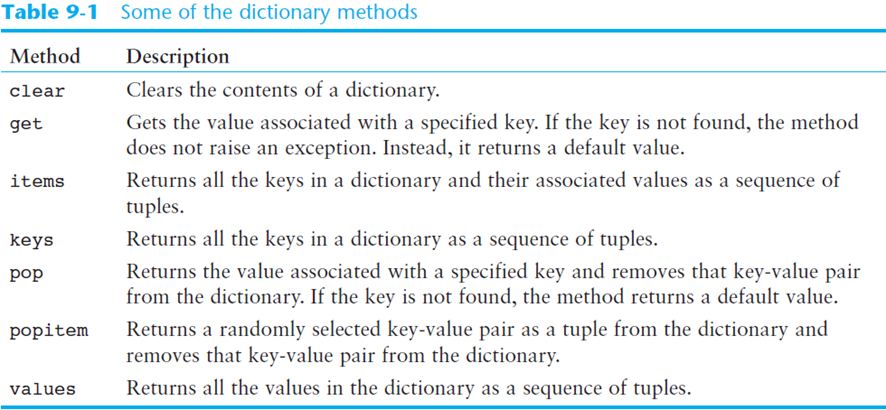
The clear method: deletes all the elements in a dictionary, leaving it empty:
# create a simple dictionary:
phonebook = {'Chris':'555-1111',
             'Katie':'555-222',
             'Joanne':'555-333'}

print('First:', phonebook)       # check to see what's in it

phonebook.clear()                # delete all items

print('Second:', phonebook)      # check again to confirm
The get method: gets a value associated with a specified key from the dictionary. The syntax is something like this:
<dictionary>.get(<key>, <default>)
This is an alternative to the square-bracket operator ([]); if the key is not found, then the function 'get' returns 'default' (you can use a string for this parameter, as seen below). This is particularly important to know because this function will not give you an error message if it can't find the key (recall that [] raises a 'KeyError' exception if the key is not found). Here's an example:
# create a simple dictionary:
phonebook = {'Chris':'555-1111',
             'Katie':'555-222',
             'Joanne':'555-333'}

value = phonebook.get('Katie','Entry not found')
print('First:', value)

value = phonebook.get('Andy', 'Entry not found')
print('Second:', value)
The items method: returns all the dictionaries' keys associated values. These are returned as a dictionary view: each element in the dictionary is a tuple which contains a key and its associated value.
You can use a for-loop to iterate over the tuples in the sequence returned by the 'items' method. You can either use a variable which receives a tuple, or you can use two variables (one to "catch" the key, the other to "catch" the corresponding value from the tuple). Study this example:
# create a simple dictionary:
phonebook = {'Chris':'555-1111',
             'Katie':'555-222',
             'Joanne':'555-333'}

phonebook.items()                   # illustrates the output of 'items'
for key, value in phonebook.items():
    print(key, value)
The keys method: returns all the dictionary's keys as a sequence. Here's an example:
# create a simple dictionary:
phonebook = {'Chris':'555-1111',
             'Katie':'555-222',
             'Joanne':'555-333'}

for key in phonebook.keys():
    print(key)
phonebook.keys()
The values method: returns all the dictionary's values as a sequence. You can iterate over this sequence. Here's an illustration of how it works:
# create a simple dictionary:
phonebook = {'Chris':'555-1111',
             'Katie':'555-222',
             'Joanne':'555-333'}

print('Loop output:')
for val in phonebook.values():       # iterate over the output
    print(val)                       # of the 'values' method

val = phonebook.values()            # 'val' can NOT be used as a list

print('\n')
print(val)

type(val)
The pop method: returns the value associated with a specified key, and removes that key-value pair from the dictionary. The syntax is:
<dictionary>.pop(<key>, <default>)
If the 'key' is not found, the 'default' is returned. Here are some examples:
# create a simple dictionary
phonebook = {'Chris':'555-1111',
             'Katie':'555-222',
             'Joanne':'555-333'}

print(phonebook)                              # print initial dictionary

phonebook.pop('Chris', 'Entry not found')     # remove one entry
print(phonebook)                              # check the dictionary again
phonebook.pop('Adam', 'Entry not found')      # try removing a key that does not exist
The popitem method: returns a randomly selected key-value pair and removes that key-value pair from the dictionary. Here is an example:
# create a simple dictionary
phonebook = {'Chris':'555-1111',
             'Katie':'555-222',
             'Joanne':'555-333'}
print(phonebook)                        # print original dictionary
print('\n')

key, value = phonebook.popitem()        # 1st call to 'popitem'
print('Removed first:', key, value)

key, value = phonebook.popitem()        # 2nd call to 'popitem'
print('Removed second:', key, value)

print(phonebook)                        # check to see what's left
                                        # in your original dictionary
9.3 Recording a dictionary (optional)
Sometimes you might want to store the contents of a complex dictionary to a file. The easiest way to accomplish this is to serialize the dictionary, which amounts to converting the dictionary to a stream of bytes that can be easily stored in a file for later use.
Python has a module called pickle that allows you to serialize dictionaries (and other similar "complex data structures") with a minimal amount of work. Serializing a dictionary in Python is usually referred to as pickling.
The entire process involves a few standard steps:
- import the **pickle** module
- open a file for (binary) writing
- call the **pickle.dump** function; syntax: 'pickle.dump(dictionary,file)'
- close file
# illustates how to store a dictionary to a file:

import pickle

# create a simple dictionary
phonebook = {'Chris':'555-1111',
             'Katie':'555-222',
             'Joanne':'555-333'}

# open the file 'phonebook.dat':
output_file = open('phonebook.dat', 'wb')

# call the 'dump' function from 'pickle':
pickle.dump(phonebook, output_file)

# close file:
output_file.close()

# after this code is executed, the dictionary 'phonebook' will be
# permanently stored in the file 'phonebook.dat'
Unpickling: retrieving a pickled dictionary.
To unpickle a dictionary follow these steps:
- import the **pickle** module
- open a file for (binary) writing
- call the **pickle.load** function; syntax: 'pickle.load(file)'
- close file
# illustrates how to retrieve a dictionary that was pickled:

import pickle

# open file 'phonebook.dat' for reading:
input_file = open('phonebook.dat', 'rb')

# the dictionary will be stored in the variable 'pb':
pb = pickle.load(input_file)

print(pb)     # convince yourself that this actually worked....
Included below are some longer example regarding this topic of pickling/unpickling a dictionary.
import pickle

# main function
def main():
    again = 'y'  # To control loop repetition

    # Open a file for binary writing.
    output_file = open('info.dat', 'wb')

    # Get data until the user wants to stop.
    while again.lower() == 'y':
        # Get data about a person and save it.
        save_data(output_file)

        # Does the user want to enter more data?
        again = input('Enter more data? (y/n): ')

    # Close the file.
    output_file.close()

# The save_data function gets data about a person,
# stores it in a dictionary, and then pickles the
# dictionary to the specified file.
def save_data(file):
    # Create an empty dictionary.
    person = {}

    # Get data for a person and store
    # it in the dictionary.
    person['name'] = input('Name: ')
    person['age'] = int(input('Age: '))
    person['weight'] = float(input('Weight: '))

    # Pickle the dictionary.
    pickle.dump(person, file)

# Call the main function.
main()
import pickle

# main function
def main():
    end_of_file = False  # To indicate end of file

    # Open a file for binary reading.
    input_file = open('info.dat', 'rb')

    # Read to the end of the file.
    while not end_of_file:
        try:
            # Unpickle the next object.
            person = pickle.load(input_file)

            # Display the object.
            display_data(person)
        except EOFError:
            # Set the flag to indicate the end
            # of the file has been reached.
            end_of_file = True

    # Close the file.
    input_file.close()

# The display_data function displays the person data
# in the dictionary that is passed as an argument.
def display_data(person):
    print('Name:', person['name'])
    print('Age:', person['age'])
    print('Weight:', person['weight'])
    print()

# Call the main function.
main()
REFERENCE:
T. Gaddis, Starting out with Python (Fourth Edition), Pearson Education Ltd., 2018