11.0 Strings
We have already encountered strings on many occasions in the previous units, however our use of strings was somewhat limited. Remember that the built-in 'input()' function returns a string.
A string can be defined as a sequence of characters. Inside a string you can store virtually any data you want: your name, a phone number, some postal address, etc.
11.1 Creating a string
To create a string you must enclose the aforementioned sequence of characters between either single- or double-quote marks. You must be consistent: if you start with a double-quote mark, you need to end your string with a double-quote mark; the same goes for single-quote marks. If you mix single- and double-quote marks, you'll get error messages on the screen.
# Examples of basic strings:

a = "physics"

# a string may contain empty spaces:
b = "a string with empty spaces"

# a string may span several lines:
c = """
    this is also a string:
    3000 Prodigy Avenue
    Pleasantville
    West Nowhere
    """

# let's see what's stored in the variables a, b, and c:

print(a)
print(b)
print(c)       # note that in this case the tabs are also included
               # (note the indentation when we print it out)
In the last example we have what is called a multiple-line string. You can input this using triple quote-marks. Note that this will preserve the formatting of the text. Alternatively, you can use the line break ('\n') to achieve similar results (as we shall see shortly).
11.2 Changing the formatting (of strings)
Python comes with a number of built-in functions (also called 'methods') that allows you to change the formatting of your strings.
For example, if you want to check the length of a string, you can use the built-in function len (which has already made several "guest" appearances so far):
# illustrates the 'len' function:

name = 'Asimov'
len(name)            # print the no of characters
One set of functions that comes with strings is used to change how the letters are formatted -- these are included below with brief explanations of what each one does:
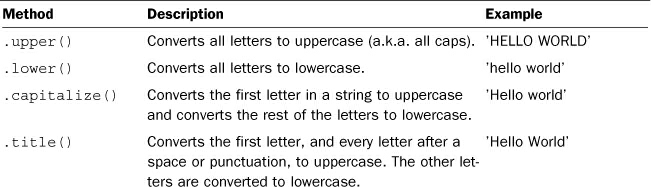
# Examples to illustrate the above built-ins:

words = "every second counts"              # a random string
print('words = ', words)                   # check it out...

words_caps = words.upper()                 # change to all caps
print ('\nwords_caps =', words_caps)       # ... no one is shouting

print('\nlowercase:', words_caps.lower())    # change to lowercase letters

print('\ncapitalize:', words.capitalize())

print('\ntitle style:', words.title())
You can also use these built-ins in a crude way, something like this:
"every second counts".upper()    # without assigning the string to a variable

# you can do the same with all the other methods
11.3 String testing methods
You can also see if certain things are true about a string. Here is one such example:
# illustrates the 'isdigit()' method for strings:

birth_year = input('Give your birth year: ')

if birth_year.isdigit():
    print(birth_year, 'contains only digits')
else:
    print(birth_year, 'contains characters other than digits')
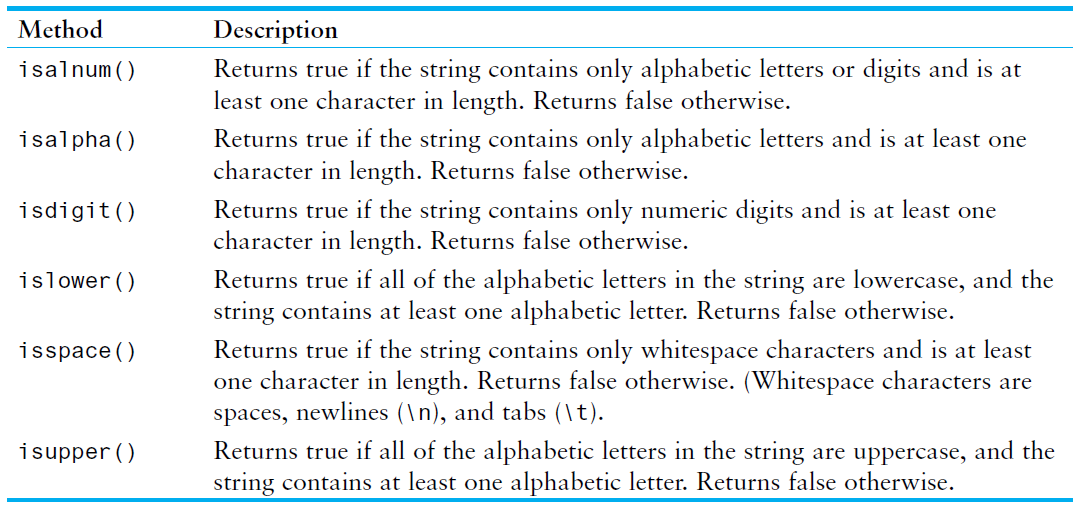
In this example, isdigit method returns 'True' if the string contains only numeric digits. Otherwise, it returns 'False'. There are many more such methods -- some of them appear in the table included below:
11.4 Mathematical operations
Strings can be added together to create new strings. Study these examples:
first_name = "Andrew"                       # create 1st str variable
last_name = "Harlan"                        # create 2nd str variable
full_name = first_name + " " + last_name    # concatenate the strings (and add xtra space between'em)
print('Name: ', full_name)                  # print result on the screen
# let's revisit Prodigy Avenue....

s = "this is also a string:"
s += "\n3000 Prodigy Avenue\n"
s += "Pleasantville\n"
s += "West Nowhere"

print(s)


# same thing,.... written differently:
print('******************************')
ss =  "this is also a string:" + "\n" + "3000 Prodigy Avenue"\
      +"\nPleasantville" + "\nWest Nowhere"

print(ss)
Strings can be multiplied by numbers (although you'll most likely not do this very often). When you multiply a string by a positive integer, Python returns a new string. If $N$ is the value of this positive integer, then the original string will be repeated $N$ times.
s = '>'*20; ss = 'x'*10
print(s); print(ss)
s = 'hello '*30        # I don't know why anyone would try to do this.....
print(s)
s = 'Hello' + '!'*5
print(s)
11.5 Other string methods
For a more detailed discussion of the many built-in functions that you can use with strings, see the recommended textbook as well as the link included below (the official documentation is also a good source of information, albeit a little bit cryptic).
The split method splits the string into a list where each word is a list item:
txt = "Nine nimble noblemen nibbling nuts"

txt.split()
By default, this function splits the string wherever it finds an empty space; that's why we end up with a list that contains all the words in our string. You can change the default behaviour by specifying your own separator. For example:
txt = "Hello, I am Fred, and I am unemployed."
txt.split(",")
Note that we get a list that contains only 3 elements (the bits that were separated by commas).
The function strip is quite different from 'split'. The former removes any leading and trailing characters from the string. Removing whitespaces is the default behaviour, but you can also specify what characters are to be removed:
txt = "      Nutella       "
print(txt)                 # leading + trailing spaces included
print(txt.strip())         # trimmed version of 'txt'
txt = "....gfbfg....Nutella.....brrrr"
txt.strip(".gbrf")      # the order of the specified characters is not important
The method find finds the first occurence of a specified value. The syntax is:
<string>.find(value, start, end)
where 'value'= is a required parameter and represents the value to search for; 'start' and 'end' are optional and indicate where to start and where to end the search. The characters in a string can be accessed as the elements of a list, by using indexing; the first character in a string has index = 0. If the length of the character is $N$, the last character has index $(N-1)$.
# counts how many 'e's are in a given string (sentence):

txt = "She sells sea shells by the sea shore"        # this is the string

N = len(txt)          # get string length
count = 0             # initialize counter variable
i = 0                 # initialize index variable

while (i < N):
    j = txt.find("e", i, N)
    count += 1
    i = j+1           # increment the index to skip the part
                      # of the string already processed (0 <= i <= j)

print('Frequency of \'e\':', count)

# the 'find()' method returns the index of the position where the element is found
A good collection of string methods together with simple, easy to understand, examples can be found by visiting the link included below (a great website for learning the basics of Python):
11.6 Formatting output
We have used the print function to display various text and numerical results on the screen. It is desirable to learn of other ways to achieve better control over the information that goes to the computer screen. To this end, we shall make use of the built-in 'format()' method for strings.
Let's start with an example:
print('Betty {} a {} of butter.'.format('bought', 'a bit'))
The brackets and characters within them (called format fields) are replaced with what is passed into the 'format()' method. A number in the brackets can be used to refer to the position of the object passed into this 'format()' method:
print('{} and {}'.format('unicorns', 'rainbows'))

# this is the same as:

print('{0} and {1}'.format('unicorns', 'rainbows'))
If keyword arguments are used in the 'format()' method, their values are referred to by using the name of the argument. For example, study this example:
print('This {food} is {adjective}.'.format(food='spam', adjective='absolutely horrible'))
Let's say you want to mix in some numbers....
txt = "The price is {:.2f} dollars."
print(txt.format(45))

txt = "The price is {:f} dollars."
print(txt.format(45))
Key point: use 'f' to convert a number into a fixed point number (default 6 decimals), but use a period followed by a number to specify the number of decimals.
In the first example above we wanted 2 decimals (hence the '.2f'), while in the second example we were content with the default behaviour (6 decimals -- see all the zeros after 45).
# more example: numbers in different formats (scientific):

txt = 'We have {:e} chickens'
print(txt.format(5))

txt = 'We have {:.1e} carrots'
print(txt.format(10))

# note the use of the scientific notation for representing the above numbers
Sometimes you'll want to align the numbers you print out on the screen in columns, rows, etc.
For full details you should go to: https://docs.python.org/3/library/string.html#format-string-syntax
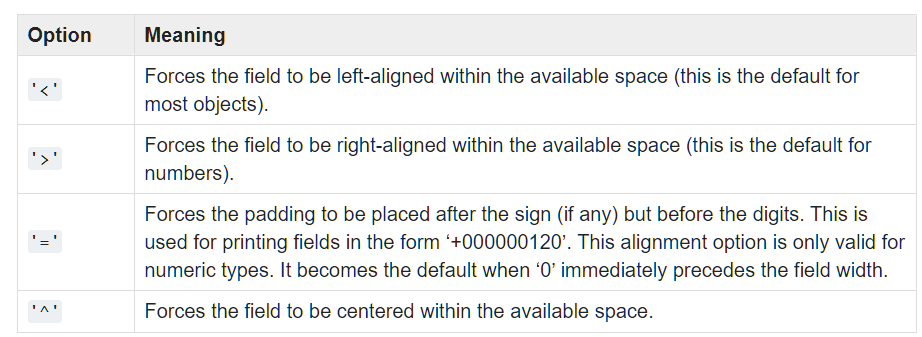
# example on how to use the alignment specifiers:

# some string variable:
txt = "Betty bought a better butter and it was better than the butter Betty bought before"

tmp_list = txt.split()        # try print(tmp_list) to see what is in 'tmp_list'
number = 0                    # initialize to 0
for word in tmp_list:
    print("{:<10s}{:>10d}".format(word, number))    # the key point....
    number += 1               # increment 'number' variable
#
#    f = floating point number
#    e = the same, but scientific notation
#    s = string
#    d = integer, etc (visit the weblink indicated above)
#
# in case it is not obvious: we counted the words in the above sentence and identified
# the position of each word within the sentence.
# the elements in the LEFT column are LEFT-justified; the ones in the RIGHT column
# are RIGHT-justified.
# (this is just one possible option; use the above table to explore this further.....)
# this example was discussed a while ago...
# recall that this a CRUDE implementation of
#                        the Newton-Raphson algorithm

from math import *
import numpy as np

nmax = 20                             # max no of iterations permitted
iter = np.zeros(nmax)                 # initialize array to store the approx.

newton2 = lambda x: x - (x**4 -2*(x**3) - 5)/(4*(x**3)-6*(x**2))

iter[0]=12.5                           # this is the (bad) guess
for i in range(1,nmax):
    iter[i] = newton2(iter[i-1])
    print("{:<10s}{:=3d}{:1s}{:>12.4f}".format('Iteration', i, ':', iter[i]))   # key point
    if fabs(iter[i]-iter[i-1]) < 1.0e-5:
        x0 = iter[i]
        break

print('\nRoot approx.:', round(x0,5))
REFERENCE:
T. Gaddis, Starting out with Python (Fourth Edition), Pearson Education Ltd., 2018