14.0 Object-Oriented Programming (OOP)
Up to this point we have been concerned with procedural programming. Our computer programs contained a number of functions, each of which was responsible for performing some specialised tasks. Delegating tasks to user-defined functions makes computer programs more modular and enhances their readability as well as their maintenance. However, large-scale software products perform tens of thousands of tasks, making the use of procedural programming fairly unattractive in the long run.
Object-oriented programming is a programming style (or "philosophy") in which tasks are achieved by objects interacting (or "collaborating") with each other. An object is defined by two things: a set of properties (attributes) and a set of behaviours (methods). The former represents the object's own data, while the methods are supposed to act upon the data.
You have already experienced OOP when you used strings, dictionaries, lists, and so on (everything in Python is an object, more or less). These were built-in objects. Python allows you to build your own objects as well (not all programming languages support this feature -- OOP has been around since 1960, but it was not until early/mid-1980's that it established itself as a strong contender for the existing alternatives).
Object type properties are data that define your object. Let's say you want to create an object type that represents a rectangle. The properties (or attributes) of objects of this type will be things like the length and width of the rectangle, the coordinates of its centre, etc.
Object type behaviours are operations that define your object. For example, in the case of the rectangle object mentioned above, you'll perhaps want to scale up or scale down your rectangle, maybe you'll want to get its area or its perimeter, etc.
14.1 Classes
A user-defined type is called a class. To create your own object type you must define a class (using the keyword 'class'); this involves writing a class definition -- a set of statements that define the data attributes and the methods that operate on that data.
The set of all methods provided by a class, together with a description of their behaviour is called the public interface of the class.
One of the key ideas of OOP is that users don't need to know how a given object stores its data, or how the methods are implemented. All they need to know is the public interface, i.e. which methods they can apply and what those methods do. Encapsulation represents the process of providing a public interface, while "hiding" the implementation details.
Driving a car, changing the TV channels on your remote control, using a web browser, etc, have many points in common with OOP. For example, driving a car does not require one to know anything about internal combustion engines; similarly, using your TV's remote control is easy, even without knowing Maxwell's electromagnetic wave propagation equations. Of course, designing and writing object-oriented computer code requires a little bit more thinking than creating procedural programs.
Classes in OOP act like factories for creating objects of a specific type. Creating a new object is called instantiation, and the object is an instance of the class.
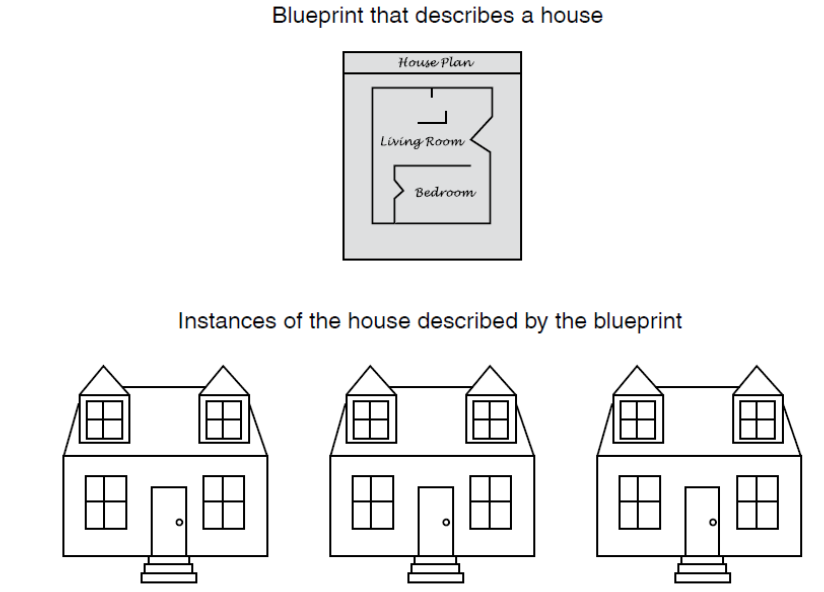
Although all these houses look the same, they might have doors of different colours, either single-glazed or double-glazed windows, etc. 'Door', 'windows', etc are the attributes; 'red', 'yellow', 'green', etc (i.e., colours) are the values of the former attribute, while 'single-glazed' or 'double-glazed' are the values of the attribute 'windows'.
It's about time we get more specific.....
class Point(object):
    """
    represents a point in 2D space
    """
blank = Point()                        # 'blank' is an instance of the class 'Point'
The keyword class starts the definition. The word 'Point' is the name of the class, as well as the name of the object that you want to define. The keyword 'object' in parentheses means that your class is going to be a Python object (all classes you define are going to be Python objects). As such, your class will inherit all basic behaviours and functionality all Python objects have.
The above class is not very useful, as it only contains a docstring. However, once the above lines of code are executed, Python becomes aware of the new type 'Point' you have just created, and will let you use it (see example immediately below). You can define variables and functions inside a class definition (like the one above). We'll do that later on. For now, we'll take the path of least resistance....
We can start adding attributes and values to the object 'blank':
class Point(object):
    """
    represents a point in 2D space
    """
blank = Point()                        # 'blank' is an instance of the class 'Point'
                                      # we say that 'blank' is (an object) of type 'Point'

blank.x = 5.0
blank.y = 10.0
# now, the variable blank refers to a 'Point' object, which contains
# two attributes. Each attribute refers to a floating point number

print(blank); print('')
print('x=', blank.x)
print('y=', blank.y)
Let's add an external function that prints the attributes of objects like 'blank' (i.e., of type 'Point'):
class Point(object):
    """
    represents a point in 2D space
    """
blank = Point()                        # 'blank' is an instance of the class 'Point'

blank.x = 5.0
blank.y = 10.0
# this next function is EXTERNAL (i.e., not a 'method' inside the class)
#-------------------------------------------------------------------------
def print_point(p):
    print("Attributes are:")
    print("({:<3.1f}, {:<3.1f})".format(p.x, p.y))
#---------------------------------------------------------------
print('')
print_point(blank)
The above examples illustrate the basic idea of a user-defined data type, but fail to take advantage of Python's functionality and versatility in dealing with OOP classes. For examples, you can arrange for your class to initialise the object properties (called the data attributes of the object: i.e., 'x' and 'y' above).
To initialise your object, you have to implement a special built-in function, __int__ (note the double underscores). Here's a more "grown-up" version of what we've been trying to do above:
# a basic example of class:

class Point(object):
    def __init__(self, xval, yval):
        self.x = xval
        self.y = yval
    def print_point(self):
        print("Attributes are:")
        print("({:<3.1f}, {:<3.1f})\n".format(self.x, self.y))
# EndOfClass definitions
#--------------------------------------------------------------------
# Here we test our class:
# p1, p2 are variables of type 'Point' -- that is, objects produced by the class 'Point'

p1 = Point(1, 2)      # xval=1  and  yval=2
p2 = Point(3, 4)      # xval=3  and  yval=4

# print attributes of various instances:
p1.print_point()      # note how we access the methods available for p1 and p2
p2.print_point()
The __init__ definition looks like a function, except that it appears inside a class. Any function defined inside in a class is known as a method. Such functions define operations you can do on an object of that type (i.e., instantiated from that class).
The code inside __init__ is generally used to initialize the data attributes that define the object. It is possible to call other methods inside the __init__ function.
Note the variable self. This variable is used to tell Python that you'll be using this variable to refer to any object you'll create of the type 'Point'. You should think of 'self' as a placeholder variable for any object created with the class 'Point'. Every variable defined using 'self' refers to a data attribute of the object.
(It takes a while to get used to 'self'....)
Here is a rough sketch (blueprint) of a general Python class:
# hypothetical class
# (you can run it, but it does not do anything very meaningful)

class MyClass(object):
    def __init__(self, p1, p2):
        self.attr1 = p1
        self.attr2 = p2
        # of course, you can have as many attributes as you like...

    def method1(self, arg):
        # can initialize new attributes outside constructor:
        self.attr3 = arg
        return self.attr1 + self.attr2 + self.attr3

    def method2(self):
        print("Keep calm...")

    # you can add as many methods as you want....

# if you want to use this class, you would need to
# use the following commands/statements:

m = MyClass(6, 10)
print(m.method1(-2))
m.method2()                   # the empty parentheses MUST be there....
Key Point: It is common to have a constructor where attributes are initialized, but this is not a requirement -- attributes can be defined whenever desired.
Next, we look at another example in which we allow objects from the previously defined class 'Point' to interact with objects from a new class called 'Rectangle':

# the class 'Rectangle' -- see above

class Point(object):
    def __init__(self, xval, yval):
        self.x = xval
        self.y = yval
    def print_point(self):
        print("({:<3.1f}, {:<3.1f})\n".format(self.x, self.y))

class Rectangle(object):
    """
    Represents a rectangle
    Attributes: width, height, corner (lower-left)
    """
    def __init__(self, width_val, height_val, corner_val):
        self.width = width_val
        self.height = height_val
        self.corner = corner_val
    def findCentre(self):
        x1 = self.corner.x + self.width/2.0
        y1 = self.corner.y + self.height/2.0
        p = Point(x1,y1)
        return p

# testing the classes:
p1 = Point(4, 9)                  # p1 is an object of type 'Point'
box = Rectangle(3, 7, p1)        # note p1 on th RHS....

print('')
print('Rectangle centre coordinates:')
box.findCentre().print_point()      # we're using methods from both classes!!
Object Lifecycle: objects are created, used, and discarded (as illustrated by the example below).
Here is a more in-depth look at the life of Python objects. We have special blocks of code ('methods') that get called at the moment of creation (constructor) and at the moment of destruction (destructor).
This is shown in the example below:
class PartyGoer(object):
    # 'x' keeps track of the # parties:
    x = 0
    def __init__(self):
        # this is to initialize the states of your objects
        print('I am constructed')

    def party(self):
        self.x += 1               # increment 'x'
        print("So far", self.x)

    def __del__(self):                             # 'del' stands for 'delete'
        print('I am destructed', self.x)


# test the above class:
one = PartyGoer()             # instantiate an object

one.party()                   # add one party
one.party()                   # add another party
one.party()                   # add one more party...

one = 42                      # re-assign 'one' to an integer
                              # (at this point the destructor is called)
print('one contains', one)    # check to see what's left in 'one'
14.2 Turning a function into a class
Consider the function
$$ F(x; a, b) = e^{-ax}\sin(bx)\,, $$
which depends on the parameters $a$, $b\in\mathbb{R}$. This formula defines an entire set of functions; for example if $a=2$ and $b=3$, you get
$$ f(x):= F(x; 2, 3) \equiv e^{-2x}\sin(3x) $$
etc. You can represent such functions by Python classes; the parameters $a$ and $b$ are going to be the attributes of our object. You can also add approximations for its first and second derivative, and so on. These features are included in the next few examples.
import numpy as np

class F(object):
    def __init__(self, a, b):
        self.a = a
        self.b = b

    def value(self, x):
        a, b = self.a, self.b                # aliasing
        return np.exp(-a*x)*np.sin(b*x)

# let's use the class:

f = F(2,3)
f.value(1)        # supposed to be f(1)
# Same example as above, but does a slightly more meaningful
# thing -- it plots several functions (i.e., F for different a- and b-values)
#

import numpy as np
from matplotlib import pyplot as plt

# class defining a function with parameters:
class F(object):
    def __init__(self, a, b):
        self.a = a
        self.b = b

    def value(self, x):
        a, b = self.a, self.b
        return np.exp(-a*x)*np.sin(b*x)


# let's use the class in a more meaningful way:

X = np.linspace(0, 6, 200)         # equally spaced pts between 0 and 6 (200 of'em)

b_list = [0.3, 2.0, 4.0, 8.0]      # several values of b
for k in b_list:                   # instantiate one object for each value of b
    f = F(1, k)                    # ... this is done here
    Y = f.value(X)                 # get the Y-values associated with the above X
    plt.plot(X,Y, label=str(k))    # plot the function

plt.legend()
plt.xlabel('x')
plt.ylabel('y')
plt.grid()
plt.show()                         # must add this outside the loop (unless you want a separate
                                   # window for each plot)

The special (built-in) method __call__ makes it possible to call your object as an ordinary function. Instances with such methods are said to be callable objects. In Python, any function is callable by default (but this is not true for objects). We can test if a given object is callable, as explained after this first example:
# "callable" objects:

import numpy as np

class F(object):
    def __init__(self, a, b):
        self.a = a
        self.b = b

    def __call__(self, x):                   # instead of 'value'
        a, b = self.a, self.b
        return np.exp(-a*x)*np.sin(b*x)

# let's use the class:

f1 = F(2,3)
f1(1)
# check to see if your object is callable:
# (Recall: the object 'f' was NOT callable)

if callable(f):
    print("Our object is callable")
else:
    print("NOT callable...")
# check to see if your object is callable:
# (Recall: the object 'f1' was callable)

if callable(f1):
    print("Our object is callable")
else:
    print("NOT callable...")
# same as above, but with the derivative as well:

import numpy as np

class F(object):
    def __init__(self, a, b):
        self.a = a
        self.b = b

    def __call__(self, x):                      # instead of 'value'
        a, b = self.a, self.b
        return np.exp(-a*x)*np.sin(b*x)

    # simple finite-difference approximation:
    def df(self, x, h=1.0E-5):                  # note the default value
        a, b = self.a, self.b
        return (self(x+h)-self(x-h))/float(2*h)

#---------------------------------------------------------------------------------
# let's use the class:

f = F(2,3)             # create an instance (i.e., object) of type F
var1 = f.df(1)         # f'(1); can find any other value: f'(0.5), f'(3.2), etc
var2 = f.df(1, 0.3)    # f'(1), but a worse approximation (h=0.3)

print('Good approx.: ', var1)
print('Lousy approx.: ', var2)
# exact (derivative) result:
# the formula written below is obtained with pen and paper...
#

def dfdx(x):
    a = 2; b = 3
    return -np.exp(-a*x)*(a*np.sin(b*x)-b*np.cos(b*x))    # exact derivative

dfdx(1)     # f'(1)